FilePicker
A control that allows you to use the native file explorer to pick single or multiple files, with extensions filtering support and upload.
On Linux, this control requires Zenity when running Flet as a desktop app. It is not required when running Flet in a browser.
To install Zenity on Ubuntu/Debian run the following commands:
sudo apt-get install zenity
Inherits: Service
Events
Methods
get_directory_path- Selects a directory and returns its absolute path.pick_files- Opens a pick file dialog.save_file- Opens a save file dialog which lets the user select a file path and a file name to save a file.upload- Uploads picked files to specified upload URLs.
Usage
Create an instance of FilePicker:
import flet as ft

file_picker = ft.FilePicker()
To open the file picker dialog call one of these three methods:
pick_files(), save_file()
or get_directory_path(), depending on the use case.
In most cases you can use a lambda function for that:
ft.Button(
    content="Pick files,
    on_click=lambda _: file_picker.pick_files(allow_multiple=True)
)
Uploading files
To upload one or more files, call FilePicker.pick_files()
to let the user select files, then pass the returned list to
FilePicker.upload() to perform the upload.
If you need to separate uploads for each user you can specify a filename
prepended with any number of directories in
page.get_upload_url() call, for example:
upload_url = page.get_upload_url(f"/{username}/pictures/{f.name}", 600)
/{username}/pictures directories will be automatically created inside upload_dir if non-existent.
Upload storage
Notice the usage of page.get_upload_url() method –
it generates a presigned upload URL for Flet's internal upload storage.
You can generate presigned upload URL for AWS S3 storage using boto3 library.
The same technique should work for Wasabi, Backblaze, MinIO and any other storage providers with S3-compatible API.
To enable Flet saving uploaded files to a directory provide a full or
relative path to that directory in flet.run() call:
ft.run(main, upload_dir="uploads")
You can even put uploads inside assets directory, so uploaded files, e.g. pictures, docs, or other media, can be accessed from a Flet client right away:
ft.run(main, assets_dir="assets", upload_dir="assets/uploads")
and in your app you can display the uploaded picture with:
ft.Image(src="/uploads/<some-uploaded-picture.png>")
Examples
Pick, save, and browse directories
import flet as ft


def main(page: ft.Page):
    async def handle_pick_files(e: ft.Event[ft.Button]):
        files = await ft.FilePicker().pick_files(allow_multiple=True)
        selected_files.value = (
            ", ".join(map(lambda f: f.name, files)) if files else "Cancelled!"
        )

    async def handle_save_file(e: ft.Event[ft.Button]):
        save_file_path.value = await ft.FilePicker().save_file()

    async def handle_get_directory_path(e: ft.Event[ft.Button]):
        directory_path.value = await ft.FilePicker().get_directory_path()

    page.add(
        ft.SafeArea(
            content=ft.Column(
                controls=[
                    ft.Row(
                        controls=[
                            ft.Button(
                                content="Pick files",
                                icon=ft.Icons.UPLOAD_FILE,
                                on_click=handle_pick_files,
                            ),
                            selected_files := ft.Text(),
                        ]
                    ),
                    ft.Row(
                        controls=[
                            ft.Button(
                                content="Save file",
                                icon=ft.Icons.SAVE,
                                on_click=handle_save_file,
                                disabled=page.web,  # disable this button in web mode
                            ),
                            save_file_path := ft.Text(),
                        ]
                    ),
                    ft.Row(
                        controls=[
                            ft.Button(
                                content="Open directory",
                                icon=ft.Icons.FOLDER_OPEN,
                                on_click=handle_get_directory_path,
                                disabled=page.web,  # disable this button in web mode
                            ),
                            directory_path := ft.Text(),
                        ]
                    ),
                ],
            ),
        )
    )


if __name__ == "__main__":
    ft.run(main)
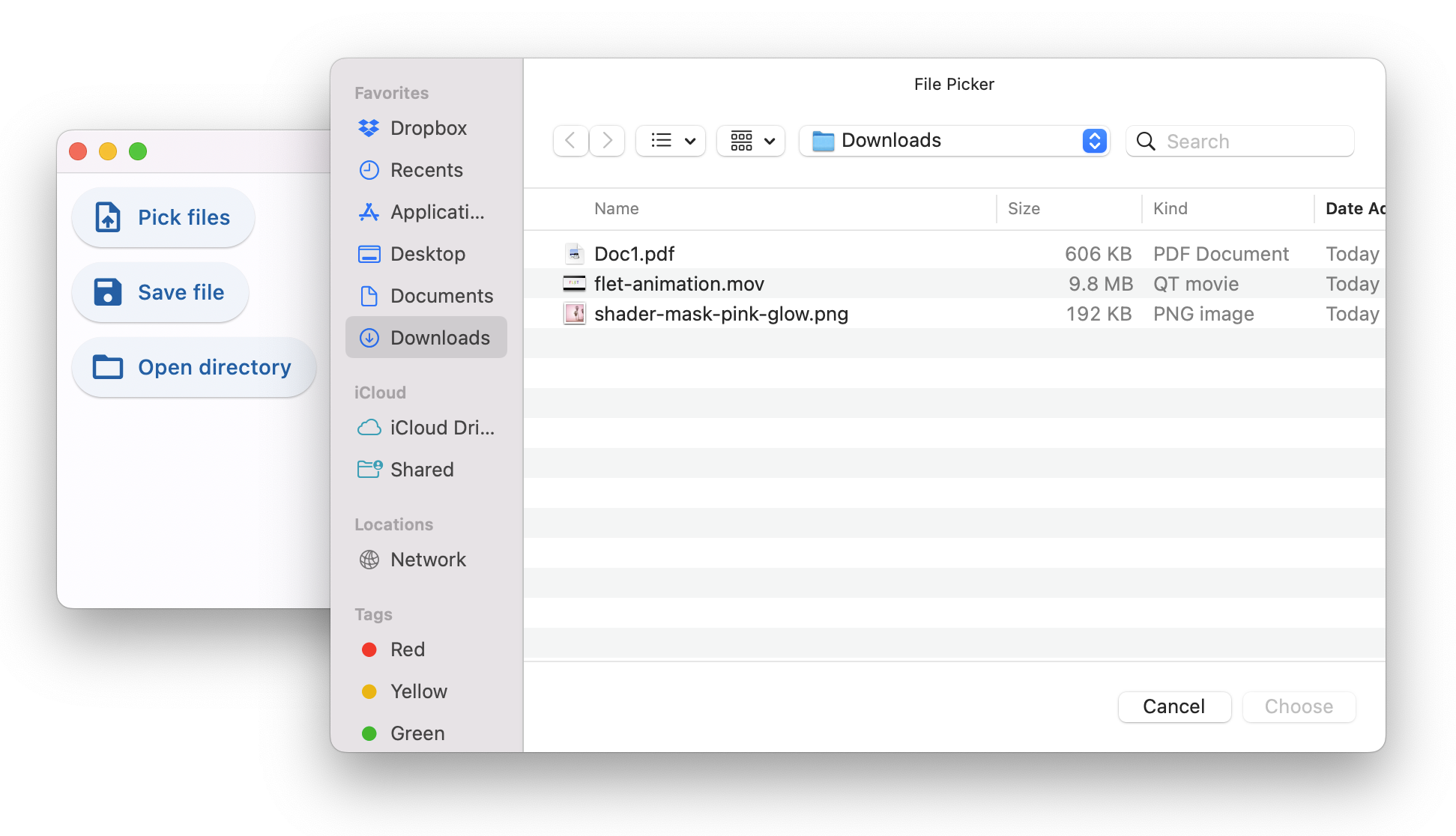
Pick and upload files
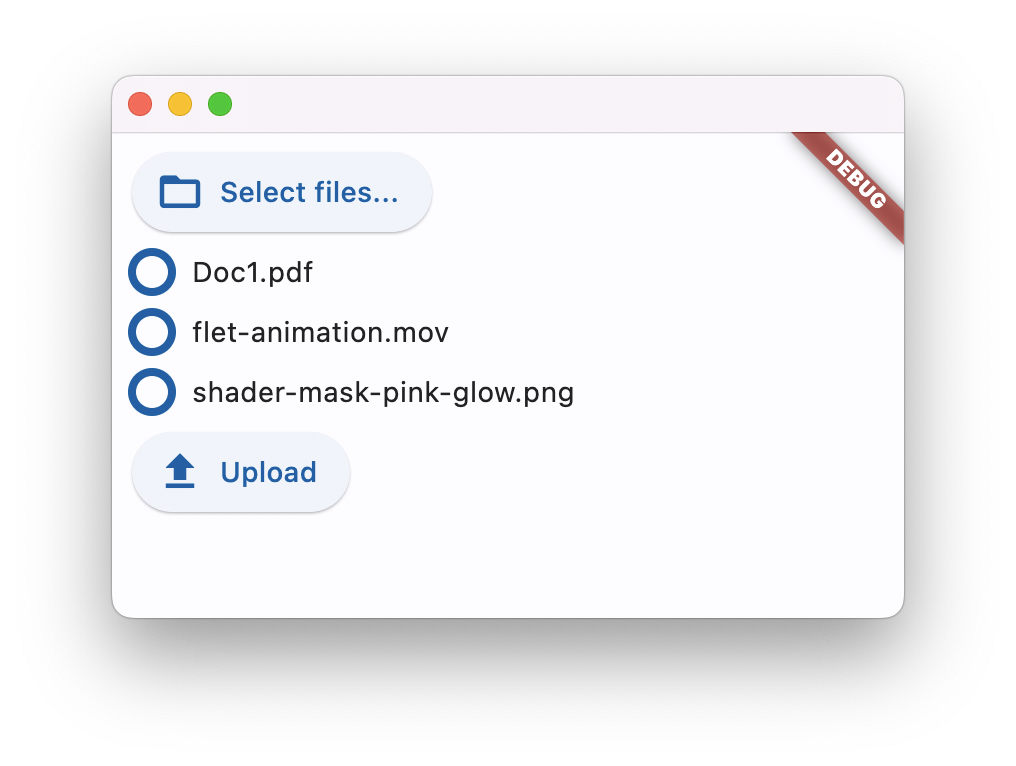
The following example demonstrates multi-file pick and upload app.
Pick and upload files
#
# Example of picking and uploading files with progress indication
#
# Run this example with:
#    export FLET_SECRET_KEY=<some_secret_key>
#    uv run flet run --web examples/services/file_picker/pick_and_upload/main.py
#
from dataclasses import dataclass, field

import flet as ft


@dataclass
class State:
    file_picker: ft.FilePicker | None = None
    picked_files: list[ft.FilePickerFile] = field(default_factory=list)


state = State()


def main(page: ft.Page):
    if not page.web:
        page.add(
            ft.SafeArea(
                content=ft.Column(
                    controls=[
                        ft.Text(
                            "This example is only available in Flet Web mode.\n"
                            "\n"
                            "Run this example with:\n"
                            "    export FLET_SECRET_KEY=<some_secret_key>\n"
                            "    flet run --web "
                            "examples/services/file_picker/pick_and_upload/main.py",
                            color=ft.Colors.RED,
                            selectable=True,
                        )
                    ],
                ),
            )
        )
        return

    prog_bars: dict[str, ft.ProgressRing] = {}

    def on_upload_progress(e: ft.FilePickerUploadEvent):
        prog_bars[e.file_name].value = e.progress

    async def handle_files_pick(e: ft.Event[ft.Button]):
        state.file_picker = ft.FilePicker(on_upload=on_upload_progress)
        files = await state.file_picker.pick_files(allow_multiple=True)
        print("Picked files:", files)
        state.picked_files = files

        # update progress bars
        upload_button.disabled = len(files) == 0
        prog_bars.clear()
        upload_progress.controls.clear()
        for f in files:
            prog = ft.ProgressRing(value=0, bgcolor="#eeeeee", width=20, height=20)
            prog_bars[f.name] = prog
            upload_progress.controls.append(ft.Row([prog, ft.Text(f.name)]))

    async def handle_file_upload(e: ft.Event[ft.Button]):
        upload_button.disabled = True
        await state.file_picker.upload(
            files=[
                ft.FilePickerUploadFile(
                    name=file.name,
                    upload_url=page.get_upload_url(f"dir/{file.name}", 60),
                )
                for file in state.picked_files
            ]
        )

    page.add(
        ft.SafeArea(
            content=ft.Column(
                controls=[
                    ft.Button(
                        content="Select files...",
                        icon=ft.Icons.FOLDER_OPEN,
                        on_click=handle_files_pick,
                    ),
                    upload_progress := ft.Column(),
                    upload_button := ft.Button(
                        content="Upload",
                        icon=ft.Icons.UPLOAD,
                        on_click=handle_file_upload,
                        disabled=True,
                    ),
                ],
            ),
        )
    )


if __name__ == "__main__":
    ft.run(main, upload_dir="examples")
Pick text content and save/download it
Use pick_files() with with_data=True when
you need file contents directly, such as in web apps where
FilePickerFile.path is not available.
Pick and save text content
#
# Example of picking and saving text content with FilePicker.
#
# Run this example with:
#    uv run flet run --web main.py
#
import flet as ft


def main(page: ft.Page):
    selected_file_name = ft.Text("No file selected")
    selected_file_content = ft.TextField(
        label="Selected file content",
        multiline=True,
        min_lines=8,
        max_lines=14,
    )
    save_status = ft.Text()

    async def pick_text_file(_: ft.Event[ft.Button]):
        files = await ft.FilePicker().pick_files(
            allow_multiple=False,
            with_data=True,
            file_type=ft.FilePickerFileType.CUSTOM,
            allowed_extensions=["txt", "md"],
        )
        if not files:
            selected_file_name.value = "Selection cancelled"
            selected_file_content.value = ""
            return

        selected = files[0]
        selected_file_name.value = f"Selected: {selected.name} ({selected.size} bytes)"
        selected_file_content.value = (
            selected.bytes.decode("utf-8", errors="replace") if selected.bytes else ""
        )
        save_status.value = ""

    async def save_text_file(_: ft.Event[ft.Button]):
        file_name = "flet_text_content.txt"
        file_path = await ft.FilePicker().save_file(
            file_name=file_name,
            file_type=ft.FilePickerFileType.CUSTOM,
            allowed_extensions=["txt"],
            src_bytes=selected_file_content.value.encode("utf-8"),
        )
        if page.web:
            save_status.value = f"Downloaded as {file_name}"
        else:
            save_status.value = (
                f"Saved to: {file_path}" if file_path else "Save cancelled"
            )

    page.add(
        ft.SafeArea(
            content=ft.Column(
                controls=[
                    ft.Text(
                        "Pick a .txt/.md file and load its text from "
                        "FilePickerFile.bytes"
                    ),
                    ft.Button(
                        content="Pick text file",
                        icon=ft.Icons.UPLOAD_FILE,
                        on_click=pick_text_file,
                    ),
                    selected_file_name,
                    selected_file_content,
                    ft.Button(
                        content="Save / Download text",
                        icon=ft.Icons.DOWNLOAD,
                        on_click=save_text_file,
                    ),
                    save_status,
                ],
            ),
        )
    )


if __name__ == "__main__":
    ft.run(main)
Events
on_uploadclass-attributeinstance-attribute
on_upload: EventHandler[FilePickerUploadEvent] | None = NoneCalled when a file is uploaded via upload method.
This callback is invoked at least twice for each uploaded file: once with 0.0
FilePickerUploadEvent.progress before the upload starts, and once with
1.0 FilePickerUploadEvent.progress when the upload completes.
For files larger than 1 MB, additional progress events are emitted
at every 10% increment (for example, 0.1, 0.2, ...).
Methods
get_directory_pathasync
get_directory_path(
    dialog_title: str | None = None,
    initial_directory: str | None = None,
) -> str | None
Selects a directory and returns its absolute path.
Parameters:
- dialog_title (str | None, default:
None) - The title of the dialog window. Defaults to [FilePicker]. - initial_directory (str | None, default:
None) - The initial directory where the dialog should open.
Returns:
- str | None - The selected directory path or
Noneif the dialog was cancelled.
Raises:
- FletUnsupportedPlatformException - If called in web mode.
pick_filesasync
pick_files(
    dialog_title: str | None = None,
    initial_directory: str | None = None,
    file_type: FilePickerFileType = FilePickerFileType.ANY,
    allowed_extensions: list[str] | None = None,
    allow_multiple: bool = False,
    with_data: bool = False,
    compression_quality: int = 0,
    cancel_upload_on_window_blur: bool = True,
) -> list[FilePickerFile]
Opens a pick file dialog.
To upload the picked files, pass them to upload method,
along with their upload URLs.
Parameters:
- dialog_title (str | None, default:
None) - The title of the dialog window. - initial_directory (str | None, default:
None) - The initial directory where the dialog should open. - file_type (FilePickerFileType, default:
FilePickerFileType.ANY) - The file types allowed to be selected. - allow_multiple (bool, default:
False) - Allow the selection of multiple files at once. - with_data (bool, default:
False) - Read selected file contents intobytes. - compression_quality (int, default:
0) - Image compression quality from0to100.0disables compression. - cancel_upload_on_window_blur (bool, default:
True) - Web-only. Whether to treat browser window blur as a cancelled selection. Set toFalseto avoid losing valid selections on slow networks or slow machines. - allowed_extensions (list[str] | None, default:
None) - The allowed file extensions. Has effect only iffile_typeisFilePickerFileType.CUSTOM.
Returns:
- list[FilePickerFile] - A list of selected files.
Raises:
- ValueError - If
compression_qualityis not between0and100inclusive.
save_fileasync
save_file(
    dialog_title: str | None = None,
    file_name: str | None = None,
    initial_directory: str | None = None,
    file_type: FilePickerFileType = FilePickerFileType.ANY,
    allowed_extensions: list[str] | None = None,
    src_bytes: bytes | None = None,
) -> str | None
Opens a save file dialog which lets the user select a file path and a file name to save a file.
- On desktop, this method opens a dialog for the user to select a
location and file name. If
src_bytesis provided, those bytes are written to the selected file.
Parameters:
- dialog_title (str | None, default:
None) - The title of the dialog window. - file_name (str | None, default:
None) - The default file name. - initial_directory (str | None, default:
None) - The initial directory where the dialog should open. - file_type (FilePickerFileType, default:
FilePickerFileType.ANY) - The file types allowed to be selected. - src_bytes (bytes | None, default:
None) - The contents of a file. Must be provided in web, iOS or Android modes. - allowed_extensions (list[str] | None, default:
None) - The allowed file extensions. Has effect only iffile_typeisFilePickerFileType.CUSTOM.
Raises:
- ValueError - If
src_bytesis not provided, when called in web mode, on iOS or Android. - ValueError - If
file_nameis not provided in web mode.
uploadasync
upload(files: list[FilePickerUploadFile])Uploads picked files to specified upload URLs.
Before calling this method, pick_files first has to be
called to ensure the internal file picker selection is not empty.
Once called, Flet asynchronously starts uploading selected files
one-by-one and reports the progress via on_upload event.
Parameters:
- files (list[FilePickerUploadFile]) - A list of
FilePickerUploadFile, where each item specifies which file to upload, and where (withPUTorPOST).